Free SEO Topical Map Generator
Generate a complete topical map for any niche in seconds. Get a pillar page, cluster topics, and supporting articles with target keywords, search intent, and content types — all organized into a clear content hierarchy.
Generate a Topical Map
Enter your website to track its AI visibility across ChatGPT, Gemini, Claude, and Perplexity — and turn chatbot mentions into traffic.
- Set up in minutes
- Cancel anytime
What Is a Topical Map?
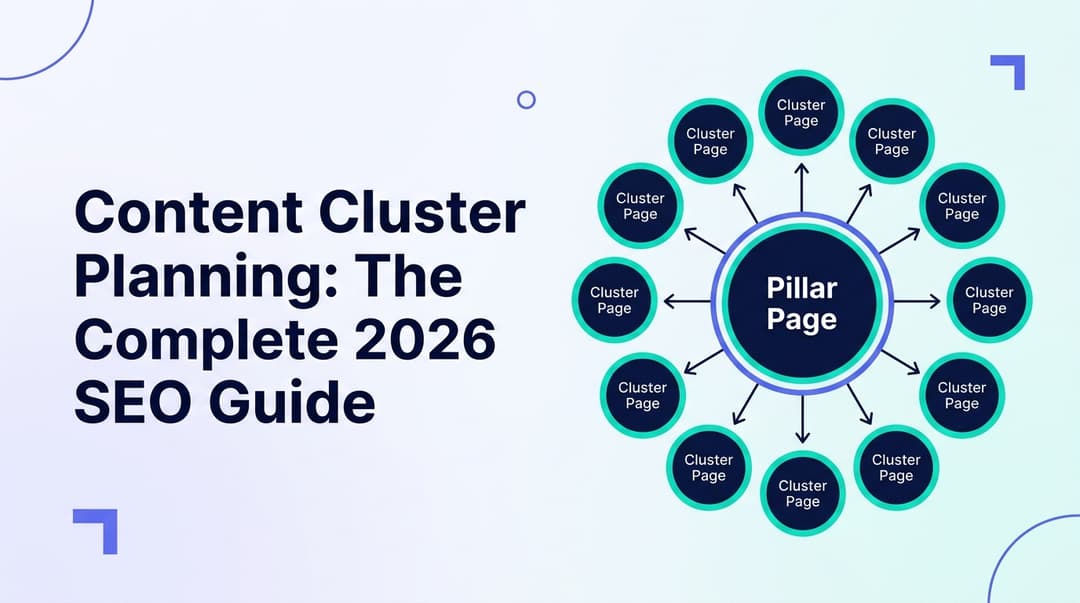
A topical map is a structured content plan that organizes all the articles you need to write around a central theme. At the top sits a pillar page — a comprehensive, authoritative piece covering the broad topic. Below it, cluster topics break the subject into major subtopics. Each cluster is then supported by specific articles that answer detailed questions, compare options, or provide step-by-step guides. This hierarchy tells search engines that your site covers the topic thoroughly, which is how you build topical authority.
Why Topical Maps Matter for SEO
- Build topical authority — search engines reward sites that cover a subject comprehensively
- Create a clear internal linking structure between pillar, cluster, and supporting content
- Avoid keyword cannibalization by assigning one target keyword per page upfront
- Prioritize content creation based on search intent and business impact
- Fill content gaps your competitors may have missed
- Give writers a clear roadmap so every article serves the overall strategy
- Improve crawlability with a logical site architecture that search engines can follow
How to Use This Tool
- Enter your main topic or niche — this becomes the foundation of your topical map
- Optionally add your target audience to get more tailored content suggestions
- Optionally provide your website URL to give the AI context about your brand
- Click "Generate Topical Map" and get a full content hierarchy in seconds
- Review the pillar page, cluster topics, and supporting articles with their keywords
- Customize the map based on your keyword research and business priorities, then start creating content
Building Topical Authority
Topical authority is what happens when search engines recognize your site as a go-to resource for a specific subject. You earn it by publishing high-quality, interlinked content that covers a topic from every angle. A topical map is the blueprint for this strategy. Instead of writing random blog posts and hoping they rank, you plan a content architecture where every article supports the others. The pillar page links down to cluster pages, cluster pages link to supporting articles, and supporting articles link back up. This creates a web of relevance that search engines can crawl and understand.
The key is consistency. Publishing a few articles from your topical map is better than none, but the real compounding effect happens when you fill in the entire map. Each new article strengthens the authority of every other article in the cluster. Start with the pillar page and highest-priority clusters, then work your way through the supporting content over time.
Frequently Asked Questions
What is a topical map?
A topical map is a structured content plan that organizes articles around a central pillar topic. It includes a pillar page covering the broad subject, cluster pages for major subtopics, and supporting articles that go deep on specific questions. This hierarchy helps search engines understand your site as an authority on the topic.
Is this topical map generator free?
Yes, completely free with no signup required. Generate topical maps for any niche or topic as many times as you need.
How many articles does a topical map include?
Each generated topical map includes one pillar page, 5-8 cluster topics, and 3-5 supporting articles per cluster. That gives you 20-45 content ideas organized into a clear hierarchy with target keywords and search intent for each piece.
How does a topical map help SEO?
Topical maps build topical authority by showing search engines that your site covers a subject comprehensively. Internal links between pillar, cluster, and supporting content create a clear semantic structure that helps search engines crawl and rank your pages for related keywords.
Can I customize the generated topical map?
Absolutely. The generated map is a starting point. You should refine it based on your keyword research, competitor analysis, and business priorities. Add, remove, or reorganize topics to match your content strategy and audience needs.
Enter your website to track its AI visibility across ChatGPT, Gemini, Claude, and Perplexity — and turn chatbot mentions into traffic.
- Set up in minutes
- Cancel anytime
Related Tools
Generate targeted blog post ideas from your business description.
Blog Outline GeneratorCreate SEO-optimized blog outlines with H2/H3 structure.
Group Keywords by IntentClassify keywords by modifier, intent, and funnel stage — or cluster them by shared terms — once your topical map is set.